...
XStore theme eCommerce WordPress Themes XStore best wordpress themes WordPress WooCommerce Themes Premium WordPress Themes WooCommerce Themes WordPress Themes wordpress support forum Best WooCommerce Themes XStore WordPress Themes XStore Documentation eCommerce WordPress Themes
Phone Lock Box Buying Guide: Key vs Digital vs Combination

Phone Lock Box Buying Guide: Key vs Digital vs Combination

When shopping for a phone lock box, the lock mechanism matters more than the material. A strong box can be nearly useless with the wrong locking system. Understanding the unique characteristics of each lock type ensures the system is tailored to satisfy every environment.
WHAT YOU'LL LEARN

IN THIS ARTICLE

Understanding your options

A Guide to the Different Kinds of Locks in Phone Lock Boxes

When shoppers shop for a phone lock box, they frequently mainly consider the material — metal, acrylic, or hybrid — while neglecting the element that most determines security and usability: the lock. A strong box can be nearly useless with the wrong locking mechanism. Locks fail for all the predictable reasons: a lost key, a forgotten combination, eroded batteries, or a digital system that wasn’t properly installed. Avoiding these pitfalls requires knowledge of the unique characteristics of each lock type to ensure that the system is tailored to satisfy every environment.
Today, both defining smaller percentage performance profiles and productivity requirements, can mean many different lock types for phone lockers.
The four lock types
Key Locks –  remain the simplest. They are dependent on physical keys and standard lock cylinders, usually combined with metal or hybrid cabinets. 
Combination Locks –  eliminate keys entirely — users memorize a numeric code or set a custom combination. 
Digital Keypad Locks –  offer programmable codes, access control, and in many cases audit trail support, but rely on power sources. 
Smart/RFID Locks –  are the top end — using cards, fobs, or mobile credentials, often integrated into larger security systems.
Cell Phone Storage Cabinet – Secure Organizer for Classrooms, Offices, and More – 36 Slot Phone Lock Box with Acrylic Door

Cell Phone Storage Cabinet – Secure Organizer for Classrooms, Offices, and More – 36 Slot Phone Lock Box with Acrylic Door

The mobile phone storage system with 36 slots serves as a protected yet efficient method for control of devices throughout classrooms and offices and public areas. This lockable organizer eliminates distractions and stops people from using phones improperly so it protects both security and organization. Schools, workplaces and public areas benefit from its durable construction which includes an acrylic door view through the individual slots. This cabinet provides dependable storage for devices while helping organizations implement phone policy enforcement so it serves as an excellent solution for all types of settings.

Features of Cell Phone Storage Cabinet:

  • 36 individual slots for phones of various sizes.
  • The lockable design feature ensures authorized access to the storage area.
  • Long-term performance comes from high-quality materials in its constructed framework.
  • The acrylic door allows visibility while shielding electronic devices from damage.
  • Classroom & office ready – ideal for schools, workplaces, and public spaces.
  • The solution efficiently arranges multiple devices in a small area without requiring extensive space.
  • This product fits examination rooms and training classrooms, serving restricted areas for various purposes.
Acrylic Cell Phone Lock Box – Secure Storage for Phones, Wallets, and Small Items with 30 Slots for Office and Classroom Use

Acrylic Cell Phone Lock Box – Secure Storage for Phones, Wallets, and Small Items with 30 Slots for Office and Classroom Use

This 30-slot acrylic cell phone lock box acts as a protective system for the storage of phones together with wallets and small-sized valuables. Users can monitor their items through its transparent acrylic material, which has durability characteristics and security features built in. Users can use this lock box for office and classroom applications as well as event facilities thanks to its design which supports 30 customizable phone slots. Organizations can use this device because it locks securely to prevent unauthorized phone use thus serving as a tool for implementing strict no-phone regulations. Workers in classrooms, conferences and people in workplaces can use their 30-slot acrylic cell phone lock system to maintain both distraction-free and safe environments.

Features of Acrylic Cell Phone Lock Box:

  • 30 individual slots in the design provide generous compartments that support all common smartphone dimensions.
  • Strong, transparent design for easy monitoring.
  • The locking system gives users both safety features and protection against unjustified entry.
  • Ideal for classrooms, offices, gyms, and events.
  • Compact yet high-capacity for organized storage.
  • The acrylic surface provides swift cleaning opportunities as it remains smooth.
Each has its own trade-offs when it comes to security, cost, maintenance, and scalability. Understanding these trade-offs is fundamental to preventing buyer regrets.
What buyers overlook

Hidden Costs & Long-Term Considerations

Real buyers neglect continuous costs. Then those may have multiple keys, a replacement of the same. Some combination locks require a professional reset. Digital locks require the replacement of their battery and occasional firmware upgrades. This means that the largest institutions could face overhauls of entire systems every 5–7 years when locks are obsolesced or fail. Ignoring these factors leads to hidden costs that exceed the initial purchase price.
Learn from others

Real Buyer Mistakes

Thus, common mistakes become apparent from following hundreds of purchases. The most common regret is to go with the cheapest option; a $120 acrylic locker featuring thin metal doors and a basic key lock frequently breaks down after just months. User behavior that does not fall in three positions is simply forgotten combinations, lost keys or software that improperly manages the digital codes. Not planning for scale subsequently leads to new systems being deployed over and over again until the level of capacity reaches beyond the initial 12–24 slots as required for their institution, particularly when transitioning to large-capacity storage systems.

Most common regrets

Choosing the cheapest option. Forgotten combinations or lost keys with no reset procedure in place. Failing to plan for scale — institutions frequently outgrow 12–24 slot systems faster than expected and end up replacing the entire setup.

Lock type breakdown

Key Locks: Advantages, Disadvantages & Top Use Cases

Key locks are straightforward. Only one cylinder lock per compartment, or a master key system for multi-slot boxes, enables swift physical access control.

Pros

Low-cost (capital and operational) with little installation complexity. No power requirements. Works reliably across environments.

Cons

Keys can be misplaced or copied. It is hard to deal with multiple users and their keys. Limited audit or access tracking.

Best Use Cases

Key locks work best in little spaces with few users — homes, small offices or classrooms where one administrator manages the storage. Since a single lost key can prevent access to an entire cabinet of 12 slots, key management is critical for a 12-slot metal locker. Boxes under $150 employ this system, and it would work well for low-risk situations.
Lock type breakdown

Combination Locks: Pros and Cons, Best Use Cases

Combination locks eliminate physical keys from the equation, asking users to enter a numeric code. They are also prevalent in schools because they simplify distribution and eliminate lost key problems.

Pros

No physical key dependency. Codes can be shared or reset without having to replace the hardware. Moderate pricing, typically $150–$300 for multi-slot lockers.

Cons

Users may forget combinations. Multi-user setups can be time-intensive for resets. Less expensive models can be more readily manipulated.

Best Use Cases

Combination locks work well for schools, summer camps and shared training environments, especially in school storage environments where administrative simplicity matters. To illustrate, a 24-slot combination locker at a high school is sufficient to accommodate the daily turnover with little administrative involvement. In larger offices, where several codes could be used, this can become an unwieldy process unless these are integrated into a computerized platform.

Lock type breakdown

Digital Locks: Benefits, Limitations & Optimal Applications

Digital keypad locks provide a more sophisticated control. With some models, users can also assign individual codes, set time restrictions and track access events.

Pros

Audit trails and programmable access. Scalable for dozens of users. No physical keys to misplace.

Cons

Requires batteries or wiring, meaning there are maintenance aspects. Greater initial outlay — $300–$700 for medium-grade multi-slot models. Well known to be sensitive to environmental conditions if inadequately rated.

Best Use Cases

Digital systems help offices, corporate labs and high-stakes testing centers. For example, IT administrators can assign temporary codes to contractors without giving them a key when the locker they use is a 36-slot office locker with digital locks for ease of access and increased security measures. Digital locks excel in settings where multiple people have regular access to the locker, and accountability matters.
Side by side

Security Comparison Table

Lock Type
Theft Resistance
Ease of Use
Cost
Key
Medium
High
Low
Combination
Medium
Medium
Medium
Digital
High
Medium
High
Smart / RFID
High
Medium
Very High
Before you buy

Final Recommendation Framework & Practical Buying Checklist

Having a structured approach makes the decision easier.
1

Budget

Assess how much can be spent near term and longer term, factoring in maintenance, battery replacements, and potential system overhauls.
2

Floor Area & Slot Count

Small setups of fewer than 15 slots may use a key lock. Between 15–50 slots, use at least a combination or digital lock. Above 50, digital, smart, hybrid, or RFID options are recommended, particularly when planning for long-term classroom storage needs.

3

Security Level

Determine the risk of theft or unauthorized access in your environment. High-volume environments favor combination or digital locks for speed and traceability.
Practical buying checklist
Confirm the box will fit the biggest device expected. Check lock durability: brass cylinder or plastic keypad. Evaluate replacement or reset procedures. Assess power or battery requirements. Consider administrative control requirements and audit trails. Verify compliance with current security or access systems. Factor in costs for long-term maintenance and upgrades.
Featured products

Phone Lock Box Products

After evaluating units across schools, offices, and homes, these are the lock boxes that consistently deliver on capacity, security, durability, and daily usability. Each pick is matched to a specific environment and use case.

EDITOR'S PICK · BEST FOR SCHOOLS & OFFICES

36-Slot Stainless Steel Wall-Mount Phone Locker

The most versatile high-security phone lock box in our lineup. Wall-mounted stainless steel construction with a built-in combination lock — built for classrooms, offices, factories, and labs that need reliable, tamper-resistant secure phone storage.

$88.00

Available on Amazon · Ships with mounting hardware

Cell Phone Storage Cabinet – Secure Organizer for Classrooms, Offices, and More – 36 Slot Phone Lock Box with Acrylic Door

Cell Phone Storage Cabinet – Secure Organizer for Classrooms, Offices, and More – 36 Slot Phone Lock Box with Acrylic Door

The mobile phone storage system with 36 slots serves as a protected yet efficient method for control of devices throughout classrooms and offices and public areas. This lockable organizer eliminates distractions and stops people from using phones improperly so it protects both security and organization. Schools, workplaces and public areas benefit from its durable construction which includes an acrylic door view through the individual slots. This cabinet provides dependable storage for devices while helping organizations implement phone policy enforcement so it serves as an excellent solution for all types of settings.

Features of Cell Phone Storage Cabinet:

  • 36 individual slots for phones of various sizes.
  • The lockable design feature ensures authorized access to the storage area.
  • Long-term performance comes from high-quality materials in its constructed framework.
  • The acrylic door allows visibility while shielding electronic devices from damage.
  • Classroom & office ready – ideal for schools, workplaces, and public spaces.
  • The solution efficiently arranges multiple devices in a small area without requiring extensive space.
  • This product fits examination rooms and training classrooms, serving restricted areas for various purposes.
Acrylic Cell Phone Lock Box – Secure Storage for Phones, Wallets, and Small Items with 30 Slots for Office and Classroom Use

Acrylic Cell Phone Lock Box – Secure Storage for Phones, Wallets, and Small Items with 30 Slots for Office and Classroom Use

This 30-slot acrylic cell phone lock box acts as a protective system for the storage of phones together with wallets and small-sized valuables. Users can monitor their items through its transparent acrylic material, which has durability characteristics and security features built in. Users can use this lock box for office and classroom applications as well as event facilities thanks to its design which supports 30 customizable phone slots. Organizations can use this device because it locks securely to prevent unauthorized phone use thus serving as a tool for implementing strict no-phone regulations. Workers in classrooms, conferences and people in workplaces can use their 30-slot acrylic cell phone lock system to maintain both distraction-free and safe environments.
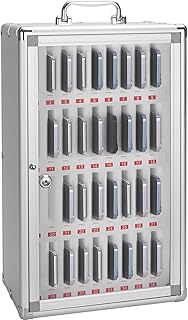
Features of Acrylic Cell Phone Lock Box:

  • 30 individual slots in the design provide generous compartments that support all common smartphone dimensions.
  • Strong, transparent design for easy monitoring.
  • The locking system gives users both safety features and protection against unjustified entry.
  • Ideal for classrooms, offices, gyms, and events.
  • Compact yet high-capacity for organized storage.
  • The acrylic surface provides swift cleaning opportunities as it remains smooth.
Common questions

Frequently asked questions

It is preferable to use digital locks or smart/RFID systems, as these provide the best tamper resistance, and support for access tracking/recording.
Yes, but there need to be regular reminders or simple reset procedures to prevent forgotten codes.
Usually every 12–18 months depending on usage; environments with high turnover may attest annually.
Only if master key systems are used; otherwise multiple tenancy makes key management convoluted.
For high-stakes testing centers or corporate labs that experience frequent staff turnover and have security needs, they are generally worth the cost.
Content Strategist — PhoneLockBoxes.com

Share this article:

Facebook
LinkedIn
Twitter
Pinterest
WEEKLY INSIGHTS

The Focus & Storage Letter

One email per week. New product reviews, buying guides, and practical tips for distraction-free environments. No spam, ever.

Join 3,200+ readers · Unsubscribe anytime